XORAYA Suite
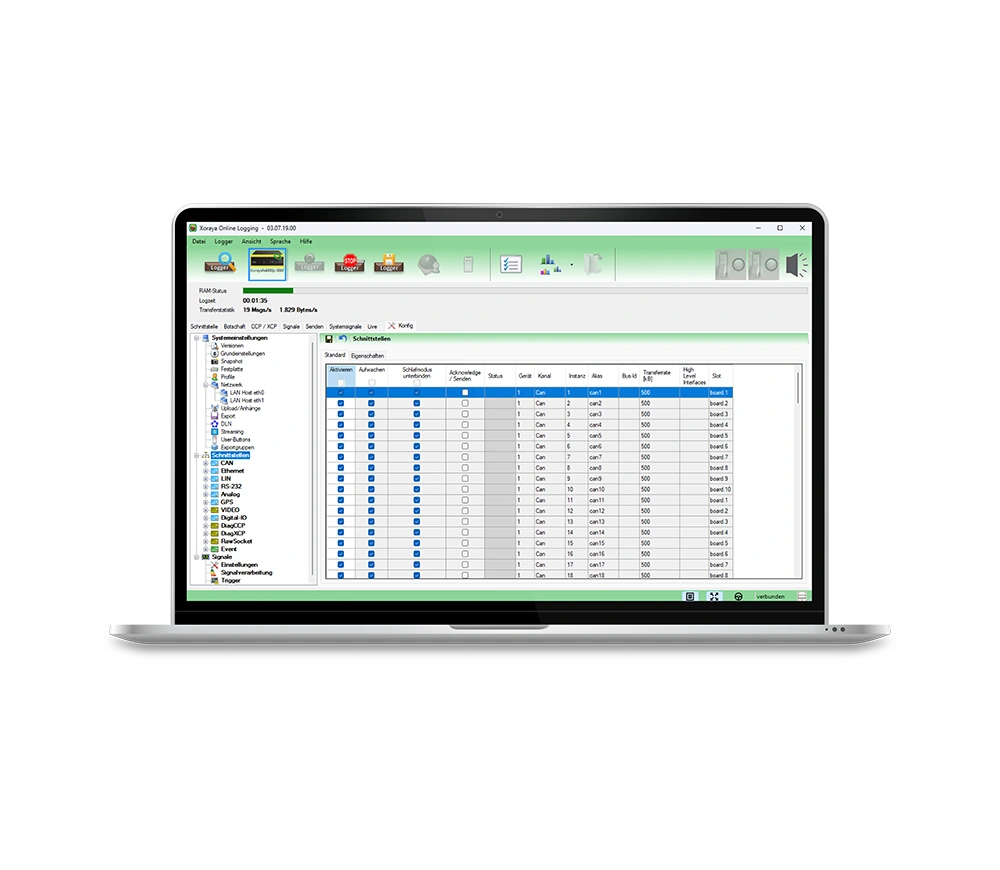
The XORAYA Suite is the central software for configuration, data recording, evaluation and firmware updates of our data loggers via desktop.
- All-in-one PC software for data logger management
- Configuration, control and live data recording
- Download measurement data from internal and external memories
- Analysis, visualization and conversion of data
- Managing a network of data loggers and probes
| Operating system |
|
|---|---|
| System requirement | min. 1 GHz Prozessor, 2 GB RAM |
| Disk space | approx. 280 MB |
Product details
Product description
The XORAYA Suite is the central software solution for the efficient management and use of our data loggers. Via the graphical user interface, it enables comprehensive configuration, data recording, analysis and firmware updates in a standardized environment. The software offers a particularly wide range of functions and also supports complex applications and detailed configurations. Users are provided with powerful tools for the precise recording, analysis and further processing of measurement data – from set-up to ongoing system maintenance. This makes the XORAYA Suite a robust and versatile solution for the entire life cycle of your data loggers.
Features & functions
The XORAYA Suite combines all central functions for the configuration, data acquisition and evaluation of data loggers in one powerful PC software. It supports both simple and complex applications – from commissioning and analysis to maintenance and automation.
- Flexible adaptation of system behavior as well as hardware and software interfaces
- Live data recording with direct analysis of messages and signals
- Easy access to measurement data from internal and external storage media
- Powerful evaluation with filter, search and visualization functions
- Real-time monitoring of system parameters such as CPU utilization
- Conversion of measurement data into common further processing formats
- Updates and license management directly in the application
- Script-based access via command line for maximum flexibility
- Adding data loggers and probes to a network
Compatibility
The XORAYA Suite is generally compatible with many newer generation data loggers. These include, for example, XORAYA N2000, ML-N4000 and N4000+.
Areas of application
The XORAYA Suite is suitable for a wide range of data acquisition and analysis applications – regardless of the specific measurement task, whether in vehicle testing, development, bus analysis or ADAS data recording. Thanks to its wide range of functions, even complex configurations and individual requirements can be mapped. The focus here is primarily on use before and after data recording: from preparation and configuration through to detailed evaluation.
Project-specific adaptations
The XORAYA Suite offers extensive options for project-specific customization and enables systems to be optimally adapted to the respective measurement task. Numerous integrated features and functions already allow flexible configuration for a wide range of requirements.
Customer-specific extensions can also be implemented – for example, additional export formats, individual trigger logics or other functional adaptations. Feel free to contact us to develop the right solution for your project together.
Technical data
Here you will find a clear and compact summary of all the technical data.
Functions
| Configuration of the Data Logger |
|
|---|---|
| Data recording in online mode |
|
| Download in HDD mode |
|
| Display and evaluation |
|
| Conversion to other formats |
|
| Firmware Update |
|
| Compound |
|
| Support |
|
System requirements
| Operating system |
|
|---|---|
| Hardware |
|
| Other |
|
FAQ
In this FAQ you will find answers to frequently asked questions about the XORAYA Suite. It offers helpful tips for the efficient use of the software.
When is the XORAYA Suite typically used?
The XORAYA Suite is used wherever recorded communication and measurement data need to be configured, monitored, analyzed, and managed. It serves as the central software platform for operating and analyzing XORAYA logging systems based on Microsoft® Windows® operating systems.
Typical application scenarios include:
- Configuration and control of data loggers, probes, and data sinks
- Monitoring and diagnostics during test runs or test bench operation
- Analysis and evaluation of recorded data
- Management and organization of large volumes of data
In this way, the XORAYA Suite complements the hardware components, serving as the central control and analysis hub within the overall system.
Which products are compatible with the XORAYA Suite?
The XORAYA Suite is fundamentally compatible with all XORAYA data loggers, probes, Datacubes, and the ASU.
Where can the XORAYA Suite be downloaded?
The XORAYA Suite can be downloaded via the X2E Wiki. To request access, please send an e-mail with your contact details to wiki@x2e.de.