XORAYA App
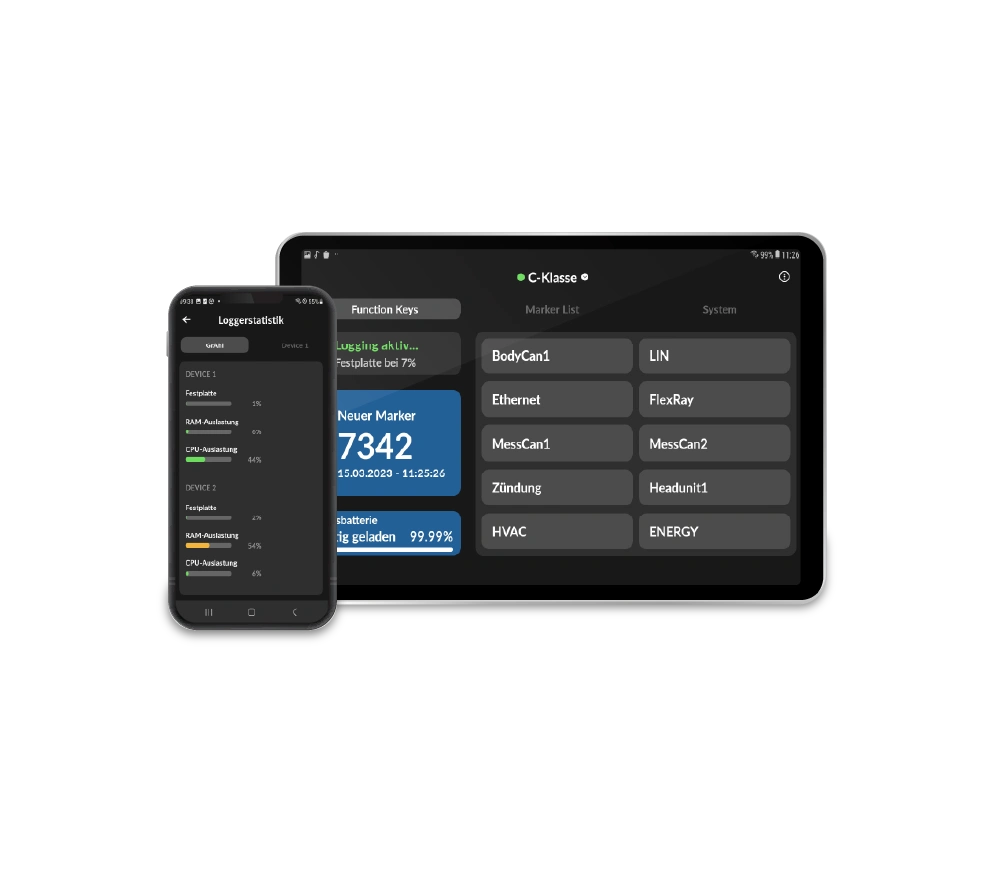
The XORAYA app is a mobile application designed for simple and fast interaction with data loggers during operation.
- Mobile app for smartphone and tablet
- Control and monitor during recording
- Fast device recognition and simple connection, e.g. via matrix code scan
- Display of signals, bus data, camera images and system and battery status
| Android |
|
|---|
Product details
Product description
The XORAYA App is a mobile application for quick and easy interaction with data loggers during operation. It enables direct access to device functions such as starting and stopping recordings, monitoring system statuses and accessing live data – conveniently via smartphone or tablet.
Thanks to its intuitive operation, the app is particularly suitable for use in vehicles or in test environments where flexibility and mobility are crucial. Users can access their systems at any time without additional hardware or complex setups. The XORAYA App therefore optimally complements existing tools and offers an efficient solution for operational use during data recording.
Features & functions
The XORAYA App offers the option of controlling and monitoring data loggers directly via mobile devices. It is specially designed for use during ongoing data recording and enables quick, intuitive access to all relevant functions.
- Installation on smartphone and tablet for mobile use
- Automatic device detection and connection via matrix code scan
- Control logging, reboot and shutdown directly in the app
- Live display of signals, bus data and system statuses
- Access to live camera images and setting (audio) markers
- Display of battery and device status in real time
- Day and night mode for optimum display under different conditions
Compatibility
The XORAYA App is compatible with data logging clusters consisting of ML-N4000, N4000, N4000+, N2000, or ASU.
Areas of application
Project-specific adaptations
The XORAYA App already offers a wide range of functions for mobile use and can be flexibly adapted to different applications. Thanks to the combination of device control, live monitoring and visualization, it can be optimally adapted to specific requirements in the field.
Project-specific extensions are also possible – for example, individual displays, additional functions or customized workflows for special application scenarios. This means that the app can be tailored to customer-specific requirements and seamlessly integrated into existing processes.
Technical data
Here you will find a clear and compact summary of all the technical data.
Functions
| Control the data logger |
|
|---|---|
| Monitor the data logger cluster |
|
| Display and evaluation |
|
| Update |
|
| Marker |
|
| Other |
|
System requirements
| Operating system |
|
|---|
FAQ
In this FAQ you will find answers to frequently asked questions about the XORAYA App. It provides helpful tips for the efficient and mobile use of the application.
When is the XORAYA App typically used?
The XORAYA App is typically used wherever mobile, fast and direct access to the data logger is required during ongoing recording.
Typical areas of application are
- Vehicle testing: operation and monitoring directly in the vehicle while driving
- Live monitoring: real-time observation of signals, bus data and system statuses
- Troubleshooting in the field: react quickly to anomalies during measurement
- Setting markers in the measurement during the test drive
- Test and validation: support for tests without an additional laptop
- Fleet operations: Mobile access to multiple systems in practical use
The XORAYA App really comes into its own during operation and in mobile use, when flexibility and immediate access are crucial.
Which products are compatible with the XORAYA App?
The XORAYA App is compatible with data logger clusters consisting of devices such as the ML-N4000, N4000, N4000+, N2000, and ASU. Support for the N8000 and N16000 is planned for the future.
Where can the XORAYA App be downloaded?
The app can be provided by our support team. Please contact us at xoraya@x2e.de.